
VALORANT Aimbot Settings: The Legit Config Guide for Ranked
Aim FOV, smoothing, bone priority and trigger delay explained, with rank-by-rank VALORANT aimbot settings and the ESP density that keeps your screen readable.
By Darkservices Team
Two players buy the same VALORANT cheat on the same day. One climbs from Diamond to Immortal over a fortnight. The other loses the account in nine days. They ran identical software. The difference sat in a config file.
Most buyers spend their research time comparing feature lists. Aim assistance, ESP, triggerbot, all of it lands in the cart on the strength of a bullet point. Then they install, open the menu, turn everything to maximum, and queue. That config wins the first four rounds and ends the account by the weekend.
This guide covers the settings themselves. If you want the product comparison instead, our VALORANT cheats buyer's guide walks Full against Lite in detail.

The principle behind every number below
Aim assistance does not need to win your duels. It needs to stop you losing the ones you should already win.
You have played the round where you cleared the angle correctly, your crosshair sat at head height, and your hand still betrayed you on the click. That round is what a good config recovers. The round where an enemy swings from a position you never checked stays lost, and no setting changes it.
Once you accept that, the numbers get easier. You stop asking how much assistance you can turn on and start asking how little you need.
Aim FOV: start narrow
Aim FOV sets the cone around your crosshair where assistance activates. A wide cone grabs targets you were not looking at. That produces the motion everyone recognises in a clip: your crosshair leaves the angle you were holding and travels to a body you had no business tracking.
Keep it tight for Vandal and Phantom rounds. Rifle duels start at range and your crosshair should already sit near the head, so the cone has little work to do. A narrow FOV also protects you during retakes, where three enemies in one frame can pull a wide cone across the screen.
Open it slightly for Spectre and Judge buys. Close-quarters fights start inside ten metres, targets cross your screen fast, and a cone that worked on Ascent mid will feel dead in B site smoke.
One habit pays for itself: set FOV per weapon class rather than per session. You buy differently on pistol rounds than on full buys, and your config should follow.
Smoothing decides whether anyone notices
Smoothing controls the speed of the correction. A lock that crosses forty degrees inside a single frame reads as machine input to anyone who watches the demo, and VALORANT keeps demos.
Medium smoothing gives you a correction that looks like a fast flick. High smoothing looks natural and arrives late in close fights. Low smoothing wins the duel and loses the account.
The number itself matters less than the consistency. A player whose crosshair snaps in some fights and drifts in others looks stranger than one whose corrections all move at the same speed. Pick a value and leave it alone for a full act.
Watch your own demos for one session before you commit. Sit in the enemy's spectator view and ask whether you would report yourself. That single test catches more bad configs than any settings table.
Bone priority: chest to open, head to close
Head priority produces the highest damage and the shortest lifespan. A player who lands only headshots across forty rounds generates the cleanest possible pattern for a review.
Chest priority survives scrutiny. Body damage still wins fights in VALORANT, especially against unarmoured opponents on eco rounds, and your first bullet landing on chest looks like the shot a strong player takes under pressure.
Run chest as your default and reserve head for finishing a duel you have already opened. Some players bind the switch to a key they hold rather than toggle, which keeps head priority for the half-second they need it.
Trigger delay: leave a human gap
A triggerbot fires when your crosshair crosses a target. With zero delay it fires the instant the pixel changes, which no human hand reproduces.
Set a delay in the range of natural reaction time and the shots stop looking automated. You lose a fraction of the fights you would have won with instant fire. You keep the account, which wins more rounds across an act than any single duel.
The triggerbot suits a specific style. It moves nothing, so it creates no unusual motion for a spectator. Plenty of players run it alone with aim assistance switched off, holding angles and letting the trigger convert their crosshair placement. If you have good pre-aim habits, try that setup before you turn on anything else.
ESP density: two clean facts beat six noisy ones
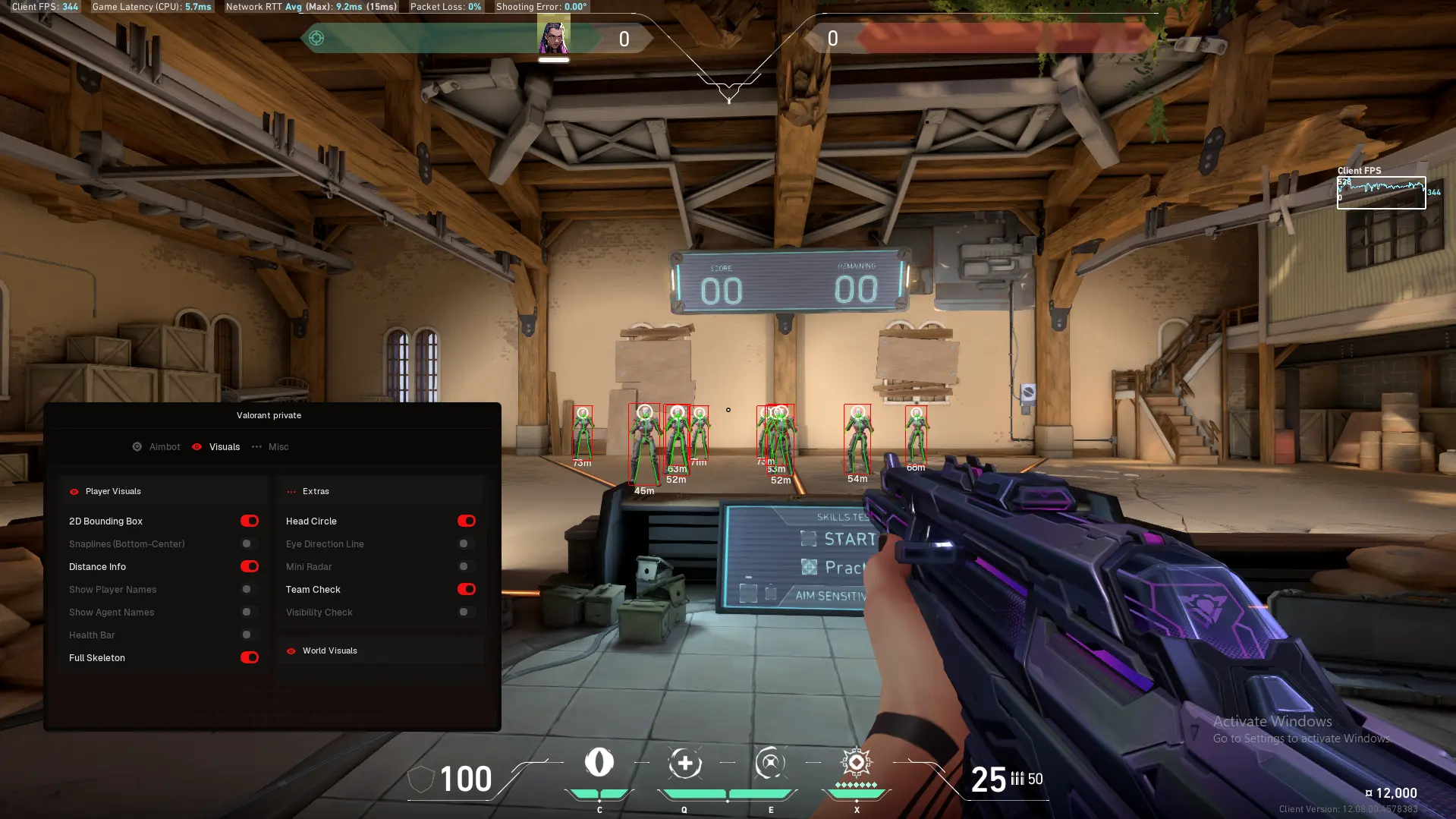
Box and skeleton carry most of the value. They tell you where an enemy stands and which way the body faces, which answers the question you actually have during a rotate.
Health and distance earn their place between fights. A 3v3 retake looks different when you know two of them sit at forty health. Distance stops your team trickling onto site one at a time.
Agent identity tells you which utility is still live. That Bind lamp corner reads differently when you know a Cypher holds it.
Everything else is negotiable. Names, weapons, kill counts and tracers fill the screen with detail you will not parse during a fight, and a crowded overlay costs you the two facts you needed. Turn elements on one at a time across a few matches and keep the ones you use.
Spike ESP belongs to the post-plant
Rounds after the plant are timing problems. Defuse progress and spike distance turn guesswork into a schedule: when to swing, when to hold a lineup, when to fake pressure and let the clock work.
Set notifications to fire on defuse start rather than on every state change. A prompt that arrives four times a round stops registering by the second half.
Distance matters more on retakes than attacking. Attacking, you already know where you planted. Defending, distance tells you whether your teammate can reach the spike before the timer or whether you should take the duel yourself.
Two configs, not one
Keep a ranked config and a lighter one for anything you record or stream.
The recording config drops aim assistance to its gentlest values and strips ESP to boxes. You give up performance in the games nobody is grading you on, and you avoid the clip that circulates.
Streamproof handles OBS and Discord capture, keeping overlays off the output while leaving them visible to you. Treat that as a capture setting. It has no bearing on detection, player reports or a Riot review, and the buyer's guide covers that distinction in more depth.
Switching profiles costs about a minute per session. That minute is the cheapest insurance in this hobby.
Settings by rank
Iron through Gold. Turn most of it off. Lobbies at this level lose rounds to positioning and utility, not to aim. Run the triggerbot and box ESP, learn the timings, and let your own mechanics improve underneath. Heavy assistance here teaches you nothing and stands out against players who miss half their shots.
Platinum through Diamond. Narrow FOV, medium smoothing, chest priority. Add health and distance to your ESP. Most of your losses come from committing to fights you should have skipped, and the information layer fixes more of those than the aim layer.
Immortal and above. Same values, tighter discipline. Opponents at this level review demos and report on instinct. The players who last here run the lightest configs, because their mechanics already handle the duels and they use assistance to remove the occasional bad day.
The pattern holds across every rank: as lobbies get better, your config should get quieter.
What settings cannot fix
Riot Vanguard loads at boot and stays resident. Riot states plainly that unauthorised software can end in a permanent ban, and no configuration removes that. Any seller promising otherwise is selling a status label.
Settings change how likely a human is to notice you. They do not change how the anti-cheat works.
If a ban lands on your machine rather than your login, new accounts keep dying within minutes of connecting. That is a hardware ban, and clearing it needs a separate tool. Our HWID spoofer covers Vanguard on the lifetime licence. Neither VALORANT product bundles one.
Which product runs these settings
Darkservices lists two:
| Product | Starting price |
|---|---|
| VALORANT Full | From $7.99 |
| VALORANT Lite | From $24.99 |
FAQ
What aim FOV should I use in VALORANT?
Narrow enough that assistance never pulls your crosshair off the angle you chose to hold. Start tight on rifles, widen a little for Spectre and Judge rounds, and adjust after watching your own demos rather than by copying a number.
Is medium smoothing enough to look legitimate?
For most lobbies, yes. Smoothing controls the speed of the correction, and a medium value produces something close to a fast flick. Consistency matters as much as the value, so avoid changing it between matches.
Why do I still lose duels with an aimbot running?
Aim assistance corrects your click, not your position. If you enter a site through the angle three players watch, no setting saves the round. Most duels at Diamond and above turn on timing and utility before anyone shoots.
Should I use silent aim instead of lock-on?
Silent aim hides the correction from your own screen, which makes it harder for you to judge how much assistance you are using. Lock-on with medium smoothing gives you feedback you can calibrate against. Start there.
Can I copy a config from someone else?
Use one as a starting point, then adjust. Sensitivity, resolution and playstyle change what a given FOV value feels like, and a config tuned for someone playing Jett entry does not suit a Cypher anchor.
How often should I change my settings?
Rarely. Pick values, run them for an act, and change one thing at a time when something specific fails. Players who retune every session never learn which setting caused which outcome.
Where to start
Set a narrow FOV, medium smoothing, chest priority and a real trigger delay. Turn ESP down to box and skeleton. Play ten matches without touching the menu, then watch two of your own demos from the enemy's view.
Adjust one value. Play ten more.
That loop produces a config you can defend, which matters more than any single number in this guide. When you are ready to buy, the VALORANT cheats page lists current stock, and support answers licence questions before checkout.